
AdFection is a way of delivering spyware through targeted online advertisements without requiring the person viewing them to click. An ad can load inside a website or app and become the entry point for an attack. The practical concern is that avoiding suspicious links does not remove every risk from browsing.
The University of Toronto's Citizen Lab documented this technique in its October 15, 2026 investigation. Here is what the findings establish, what they leave unanswered, and what an individual or business can do next.
What happened in the AdFection investigation?
Citizen Lab linked attacks targeting at least 45 Al Jazeera devices in 2024 and 2025 to Candiru spyware delivered through Discover-Tech advertisements, with high confidence. The report documents infections, but the 45-device figure is a count of targeted devices, not 45 confirmed infections.
AdFection names the delivery technique; Candiru is the spyware linked to these attacks. Keeping those separate matters when evaluating a security alert: seeing an advertisement, being selected for an attack, and confirming an infection are three different findings.
How does AdFection work without a click?
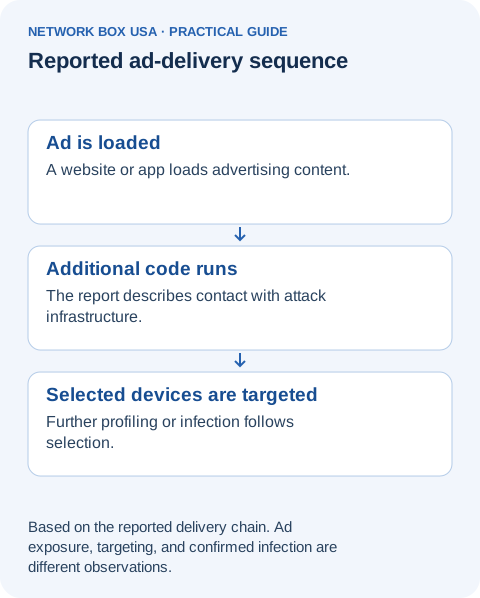
Websites and apps load advertising content automatically. In the reported chain, that background activity gives the attacker an opportunity before the viewer makes a decision:
- An advertisement loads. A site or app displays a Discover-Tech ad, sometimes in the background. The ad requests code from advertising infrastructure.
- The infrastructure selects a device. Most viewers were not selected for spyware delivery. Selected devices could undergo additional validation and profiling.
- A successful infection creates further activity. Citizen Lab traced infected devices from advertising infrastructure to a Candiru validator and then to spyware command-and-control servers.
“Zero-click” describes the absence of a required user click. It does not mean every ad successfully compromises every device. A familiar website can also load content supplied by other companies, so recognizing the site is not enough to establish the safety of everything it loads.
Which devices and browsers are affected?
Confirmed platform evidence: Citizen Lab analyzed a Windows DLL, a software library, recovered from a compromised device. That establishes Windows spyware evidence in the investigation.
Broader ad exposure: the report describes Discover-Tech advertisements appearing in Android apps, iOS apps, and websites. This is evidence of where ads reached people, not proof of successful spyware infection on every platform.
What remains unknown: the report does not provide a complete list of vulnerable browser and operating-system versions or an AdFection-specific patch matrix. It cannot establish that a particular iPhone, Android phone, Mac, or Linux computer is infected or immune. Consult the original technical findings when evaluating platform claims.
Should an ordinary business be worried?
The documented Al Jazeera attacks do not establish that every business is currently a target. They do show why a browsing policy should account for content that loads automatically, including advertising supplied through third parties.
For an IT manager, the useful next step is to check the organization's exposure: which work devices load unnecessary ads, where filtering applies, and who would investigate a suspicious event. For someone handling sensitive communications or facing a credible targeting threat, a general checklist is insufficient; involve a security professional who can assess the individual situation.
How would you know if a device was infected?
An advertisement appearing on screen is not a diagnosis. An ad-domain entry in a log is not enough either. Citizen Lab's investigation connected a sequence of network activity with additional technical evidence. A business investigation similarly needs to establish what happened on a particular device, rather than treating every advertising request as a breach.
Security teams can consult the investigation's published infrastructure details and examine available DNS, web, outbound-connection, and endpoint records together. A match needs context; no match in incomplete logs cannot rule out compromise. This article is not a self-test or a spyware removal tool.
If you have a credible alert or reason to suspect compromise:
- Contact your IT or security team promptly. Record the affected device, the approximate time, and what prompted the concern. Avoid continuing sensitive work on that device.
- Preserve evidence before attempting cleanup. Do not start by resetting, wiping, or installing an unfamiliar “removal” tool. Have the response team decide how to isolate the device and preserve useful records.
- Let the investigation guide recovery. Containment, forensic review, rebuilding, and account protection depend on what was compromised. Blocking ads afterward is a prevention measure, not evidence that an existing infection has been removed.
The Canadian Centre for Cyber Security's general compromise-response guidance explains why preserving evidence and coordinating containment matter. It is incident-response guidance, not an AdFection-specific diagnostic procedure.
What can you do to reduce exposure?
Start with managed ad and tracking controls, prompt browser and operating-system updates, and an investigation path for suspicious activity. The NSA's guidance on blocking unnecessary advertising content describes network and device controls, along with extension trust and website-compatibility considerations.
For a business, turn that advice into three practical checks:
- Test the places employees actually work. Check an office laptop, the same laptop at home, and any work-used mobile devices. A gateway policy only governs traffic that passes through it; a browser extension does not establish protection inside every mobile app.
- Manage exceptions narrowly. When a business workflow breaks, identify the specific content it needs instead of allowing an entire advertising category. Have IT approve browser extensions and maintain the policy.
- Keep prevention and investigation connected. Maintain software updates, enforce approved-software policies where supported, and confirm that relevant logs identify the device and time well enough for an analyst to investigate.
These measures reduce opportunities for attack. Updates address known vulnerabilities, and ad blocking reduces exposure; neither is proof of immunity to every undisclosed exploit.
Where Network Box USA can help
For this threat, the useful service discussion is about three jobs: reducing advertising exposure, restricting unauthorized software execution, and investigating suspicious activity.
Managed Secure Web Gateway and UTM+ provide web filtering and gateway inspection capabilities. Network Box USA can help assess which advertising requests those policies cover, including remote and roaming users. Confirm the actual configuration; web filtering capability does not automatically mean every ad source is blocked or every connection inspected.
White Cloud Security application control adds a default-deny barrier on covered Windows and Linux endpoints: in enforcement mode, untrusted applications, libraries, and scripts are blocked from executing. It does not have to identify an unauthorized file as a particular malware family before denying it. The vendor's system overview explains the trust model. This is not a claim that White Cloud has been tested to stop every AdFection exploit or every attack inside an already approved browser.
NBX Managed Detection and Response supplies investigation, threat hunting, and a 24/7 Security Operations Center. Managed SIEM capabilities, included with qualifying services, bring supported, connected log sources together. Agree which devices and evidence are covered and which response actions are authorized.
Request a Security Stack Review to examine your organization's browsing paths, execution policies, and investigation coverage with Network Box USA.
Updated October 25, 2026, with platform evidence, remaining unknowns, and guidance for suspected compromise. Original publication: October 16, 2026.