
Users, Browsers, Files, URLs, Apps, Policy.
Services · Prevent
Managed Secure Web Gateway Services
A cleaner path between users and the web.
SWG filters web destinations, inspects suspicious activity, and enforces acceptable-use policy to reduce browser-borne risk.
Based in Houston. Serving organizations and MSPs across North America.
What changes
The control matters. The ownership around it matters more.
URL filtering, Content policy, HTTPS inspection, Malware defense, Reporting.
Filter risky sites, Reduce malware exposure, Enforce policy, Improve visibility.
Service definition
What Secure Web Gateway does.
A managed Secure Web Gateway inspects and governs user web traffic, applying URL, content, malware, application, and identity-aware policy for office, remote, and roaming users.
- Organizations whose users work across offices, homes, and mobile locations
- Teams that need consistent acceptable-use and web-security policy
- Businesses seeking managed inspection and reporting without another unattended console
- Malicious sites, downloads, browser-based attacks, and unsafe web applications
- Policy gaps when users leave the corporate network
- Encrypted web traffic that can conceal threats
- Scattered web logs that slow investigation and reporting
Product details
Evaluate the capabilities that matter in your environment.
Cloud-delivered web protection applies consistent policy to office, remote, and roaming users.
HTTPS inspection, URL filtering, malware scanning, and application control operate together.
Logs can be centralized for SIEM and SOC monitoring instead of remaining in a separate console.
Architecture diagram
See the path to safer web access.
Connect the gateway's inspection capabilities to a cloud-hosted deployment for office and remote users.
Explore the full diagram, or download its single-page PDF for review and printing.
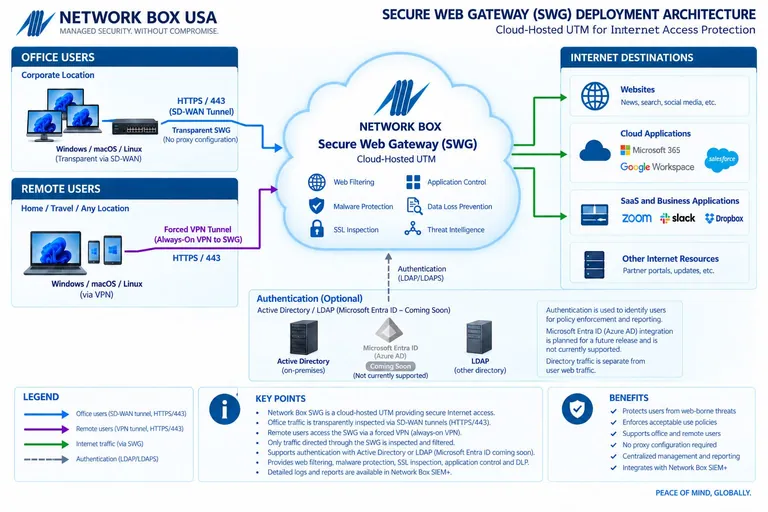
Secure Web Gateway
Cloud-hosted Internet protection for office and remote users.
Managed from day one
One continuous operating motion.
Deployment is the beginning of the service, not the end of the project.
- 01Assess the environment
Review the sites, users, systems, traffic flows, obligations, current controls, and operating constraints that shape the service.
- 02Design the coverage
Define in-scope assets, policies, integrations, retention, escalation paths, responsibilities, and success measures before deployment.
- 03Deploy and tune
Connect or install the service, validate traffic and telemetry, test policy behavior, resolve exceptions, and document the operational handoff.
- 04Monitor and respond
Operate, update, tune, review, and escalate the subscribed controls according to the agreed monitoring and support scope.
- 05Report and improve
Review activity, evidence, exceptions, service trends, and recommended next priorities with ownership made clear.
Choose the right layer
How this service differs from adjacent coverage.
These services work together, but they solve different operational problems.
Compared with Unified Threat Management
UTM+ consolidates several network-edge controls in a gateway. A Secure Web Gateway concentrates on user web access, encrypted browsing, content, destinations, and application policy.
Compared with Managed Cloud Email Security
MCES protects messages, senders, links, and attachments in the email channel. SWG protects browsing and web-delivered activity after a user reaches the internet.
Related coverage
Security works better when the layers work together.
Included with Secure Web Gateway
The service, clearly accounted for.
Review the protection, operating support, and service capabilities included in the offering.
23included
capabilities
capabilities
01
Web and network protection
- Next-generation firewall with stateful inspection, packet filtering, NAT, and routing
- Frontline, inline, and infected-LAN intrusion prevention
- DDoS protection across Layers 3–7
- IPsec, PPTP, SSL, and WireGuard VPN
- Optional DNS server
- Application identification
- Bidirectional IPv4 and IPv6 translation across Layers 3–7
- Managed web-traffic proxy
02
Inspection and policy
- Anti-malware protection for HTTP, HTTPS, and FTP
- URL antivirus scanning
- Layer 3 and Layer 7 quality of service
- Network Box Antivirus with Z-Scan
- Kaspersky or Bitdefender antivirus protection
- S-Scan content filtering
- IP-, entity-, and LDAP-based policy enforcement
- Customizable log portal and reporting
03
Managed-service layer
- 24×7×365 monitoring and PUSH security updates
- Standard service-level agreement
- 24×7 Security Operations Center
- SIEM with 90 days of rolling log access
- Security Response Center threat research
- Four ISO certifications and PCI DSS attestation
- Intelligence from more than 70 threat partners
Illustrative planning example
Trace an office and roaming browsing request
A browsing rule should apply to the intended users wherever their agreed service path runs.
- Traffic path
- Identify the actual office and roaming routes, supported clients, and destinations that bypass the gateway.
- Inspection and exceptions
- Agree the HTTPS inspection scope, certificate deployment, exclusions, and application owner for each exception.
- Unavailable path
- Document expected behavior if the protection path is unavailable, then validate it in an approved test.
This is a planning example, not a customer incident or a promise that a particular product integration is supported. Confirm the actual scope during service design.
Understand encrypted DNS and filtering →Explore the decisions behind the service
Practical Secure Web Gateway guidance.
Why proxying encrypted web traffic matters
Review visibility and deployment considerations for encrypted browsing.
Encrypted DNS vs. DNS filtering
Distinguish DNS transport privacy from destination filtering.
QR phishing across laptop and phone
Follow a browsing path that can leave the managed device.
Verify a renewed TLS certificate is deployed
Check the actual certificate served along the traffic path.
Buyer’s guide
Commercial scope and compliance context.
Evaluate the complete operating commitment, not only a license or feature list.
A defined managed scope
Scope commonly reflects protected users and locations, traffic and inspection requirements, deployment model, identity integration, logging, retention, and support. The proposal should distinguish included protection and managed operations from optional changes or integrations.
Compare the full operating cost →Technical support, not a compliance guarantee
No single product establishes compliance. These guides show where the service can support controls, operations, and evidence.
Web security assessment
Secure Web Gateway scorecard
How safe is your users’ web browsing?
Self-guided review7 questions
Answer seven questions about inspection, policy, remote users, and the operational visibility surrounding web access.
0/100
Your point-in-time result
Review in progress
Service FAQ
Questions buyers ask about Secure Web Gateway.
What is Secure Web Gateway?
A managed Secure Web Gateway inspects and governs user web traffic, applying URL, content, malware, application, and identity-aware policy for office, remote, and roaming users.
Who is Secure Web Gateway designed for?
Common fits include organizations whose users work across offices, homes, and mobile locations, teams that need consistent acceptable-use and web-security policy, and businesses seeking managed inspection and reporting without another unattended console.
What does Network Box USA manage?
The managed scope includes url filtering, content policy, https inspection, malware defense, and reporting. Exact responsibilities, coverage, escalation, and exclusions are confirmed during solution design.
How does Secure Web Gateway differ from Unified Threat Management?
UTM+ consolidates several network-edge controls in a gateway. A Secure Web Gateway concentrates on user web access, encrypted browsing, content, destinations, and application policy.
How is Secure Web Gateway priced?
Scope commonly reflects protected users and locations, traffic and inspection requirements, deployment model, identity integration, logging, retention, and support. The proposal should distinguish included protection and managed operations from optional changes or integrations.
Does Secure Web Gateway make an organization compliant?
No single security service establishes compliance. Secure Web Gateway can support technical controls and evidence associated with NIST CSF, CIS Controls v8.1, CMMC, PCI DSS, HIPAA, and SOC 2, but applicability, governance, policies, complete scope, remediation, and any assessment or certification remain the organization’s responsibility.
How is a secure web gateway different from a web application firewall?
A secure web gateway protects users accessing websites and web applications: it governs outbound browsing, destinations, downloads, and acceptable use. A web application firewall protects your published applications and APIs by inspecting inbound requests. They protect different traffic directions and can be used together.
What needs to be planned before enabling HTTPS inspection?
Define which managed devices and applications will use the gateway, how the trusted inspection certificate will be deployed, and which traffic requires an exception. Test certificate-pinned applications, authentication, and business workflows before rollout. Document privacy requirements, exception ownership, and whether remote users can bypass the protected route.
Security stack review
See where Secure Web Gateway belongs in your environment.
Start with your current controls, operating constraints, and the risks you most need to reduce.
Request a Security Stack Review