
Email, Links, Files, Users, Domains, Policy.
Services · Reduce Risk
Managed Email Security Services
Defend the channel where many breaches begin.
MCES helps reduce phishing, malicious attachments, unsafe links, spoofing, and other email-borne business risks.
Based in Houston. Serving organizations and MSPs across North America.
What changes
The control matters. The ownership around it matters more.
Anti-spam, Attachment checks, URL defense, Spoofing controls, Reporting.
Reduce phishing, Block malicious files, Protect users, Support trust.
Service definition
What Managed Cloud Email Security does.
Managed Cloud Email Security filters messages, senders, links, attachments, spoofing attempts, malware, and policy violations while providing continuity, reporting, security updates, and operational support.
- Organizations using Microsoft 365, Google Workspace, or standards-based mail services
- Teams facing phishing, impersonation, malicious attachment, and business-email-compromise risk
- Businesses that need email filtering operated as part of a wider managed security stack
- Phishing, spear phishing, spoofing, CEO fraud, and malicious links
- Malware and unsafe active content delivered through inboxes
- Mail interruption, queueing, and continuity concerns
- Email-policy and user-release workflows that consume IT time
Architecture diagram
Follow the protected mail flow.
See where email inspection sits between senders, recipients, and your mail platform, including DNS setup and bypass protection.
Explore the full diagram, or download its single-page PDF for review and printing.
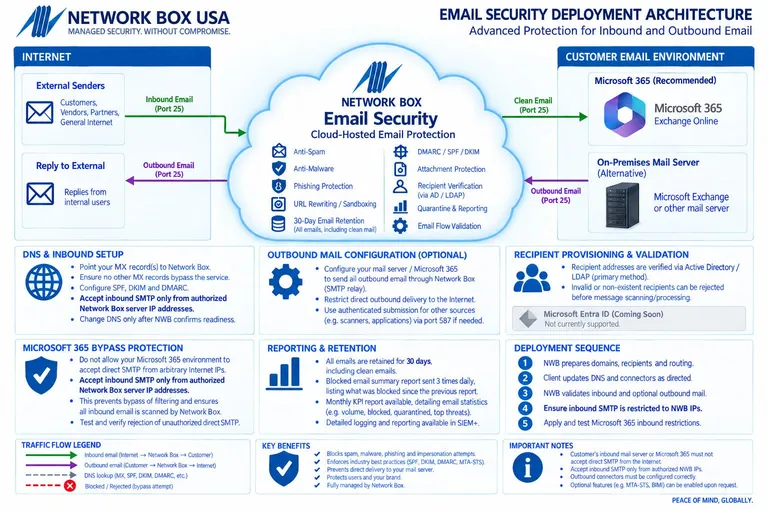
Email Security / MCES
Inbound and outbound mail flow, DNS, and bypass protection.
Product details
Evaluate the capabilities that matter in your environment.
The service combines 25 anti-spam engines, 18 anti-malware engines, and a reported 99.78% spam detection rate.
Office 365, Google Workspace, SMTP, SMTPS, and STARTTLS environments are supported.
Patented PUSH Technology and Z-Scan are used to distribute protection updates quickly.
Managed from day one
One continuous operating motion.
Deployment is the beginning of the service, not the end of the project.
- 01Assess the environment
Review the sites, users, systems, traffic flows, obligations, current controls, and operating constraints that shape the service.
- 02Design the coverage
Define in-scope assets, policies, integrations, retention, escalation paths, responsibilities, and success measures before deployment.
- 03Deploy and tune
Connect or install the service, validate traffic and telemetry, test policy behavior, resolve exceptions, and document the operational handoff.
- 04Monitor and respond
Operate, update, tune, review, and escalate the subscribed controls according to the agreed monitoring and support scope.
- 05Report and improve
Review activity, evidence, exceptions, service trends, and recommended next priorities with ownership made clear.
Choose the right layer
How this service differs from adjacent coverage.
These services work together, but they solve different operational problems.
Compared with Secure Web Gateway
MCES evaluates email senders, messages, links, attachments, and mail flow. SWG governs browsing and web traffic when users access internet destinations.
Compared with Security Awareness Training
MCES is a technical control that filters email threats. Awareness training develops the user behavior needed when social engineering reaches a person through email or another channel.
Related coverage
Security works better when the layers work together.
Included with Managed Cloud Email Security
The service, clearly accounted for.
Review the protection, operating support, and service capabilities included in the offering.
26included
capabilities
capabilities
01
Message and identity protection
- Protection for SMTP, SMTPS, and STARTTLS
- Anti-phishing and spear-phishing protection
- Anti-spoofing and CEO-fraud protection
- Envelope verification linked to LDAP, RADIUS, and Microsoft 365
- Directory-harvest and denial-of-service protection
- Blocking for known spamming IP addresses
- Proprietary sender-relationship intelligence
- OCR detection for image-based spam
02
Content and malware controls
- Network Box anti-spam filtering
- Email policy enforcement for active content
- Web policy enforcement for unsafe email content
- Network Box proprietary antivirus
- Bitdefender antivirus protection
- Z-Scan real-time zero-day malware protection
- Anti-spyware protection
- Data-loss prevention
- IPv6 support
03
Continuity and managed operations
- Thirty days of short-term email archiving
- Email disclaimers included in the service
- Email spooling and queuing for up to five days
- Three daily email-release reports
- Self-service user mail portal
- Personalized real-time user interface
- 24×7×365 monitoring and PUSH security updates
- Business-day support for email issues from 8 a.m. to 8 p.m.
- Award-winning threat intelligence
Illustrative planning example
Investigate a suspicious message that passed authentication
A message asks an employee to change payment details, even though its domain-authentication checks passed.
- Message evidence
- Review the available headers, sender context, message path, URLs, attachments, and recipient report.
- Business verification
- Verify the requested change through the established independent channel. Authentication alone does not authorize a transaction.
- Coverage boundary
- Identify mail paths outside the subscribed filtering route and record the owner of identity or payment-process actions.
This is a planning example, not a customer incident or a promise that a particular product integration is supported. Confirm the actual scope during service design.
Separate DMARC results from message safety →Explore the decisions behind the service
Practical Managed Cloud Email Security guidance.
Why DMARC pass is not a safety verdict
Distinguish authenticated sending from a trustworthy request.
QR phishing across device boundaries
Follow the user from a filtered inbox to a personal phone.
Verify a vendor bank-detail change
Use an independent approval path for payment changes.
See the operating evidence
Read an actual redacted KPI report.
The published sample includes period comparisons for device utilization, network activity, and security metrics. Its April 2025 reporting period makes it an example of the reporting format, not a current measurement of your environment.
- Capacity and workload
- CPU, memory, disk, and workload measurements help frame a capacity discussion.
- Traffic and connections
- Internet, LAN, DMZ, VPN, and connection views help identify the paths covered by the report.
- Period and context
- Compare the same metric and reporting period, then connect changes to configuration, incidents, and business activity.
Agree which sources and reports belong in your service scope. A KPI summary, an incident investigation, and an onboarding acceptance record answer different questions.
Open the redacted KPI report (PDF)Buyer’s guide
Commercial scope and compliance context.
Evaluate the complete operating commitment, not only a license or feature list.
A defined managed scope
Pricing generally reflects protected users and domains, message environment and volume, continuity and archive requirements, integrations, reporting, and support. The proposal should state the included filtering, deployment, updates, monitoring, user tools, and operational support.
Compare the full operating cost →Technical support, not a compliance guarantee
No single product establishes compliance. These guides show where the service can support controls, operations, and evidence.
Email security assessment
Email attack-surface scorecard
Scan your email domain, then answer a few questions to understand the controls around your inboxes and users.
Self-guided review8 questions
The optional public scan can prefill DMARC, SPF, and DKIM. Confirm those findings and answer the remaining questions.
01Check public email signals
Enter the organization’s email domain. The scan checks public DNS and website signals; it does not send email or access private systems.
Submitted domains and scan results may be retained by Network Box USA for security analytics and business development. Read our privacy policy.
0/100
Your point-in-time result
Review in progress
Service FAQ
Questions buyers ask about Managed Cloud Email Security.
What is Managed Cloud Email Security?
Managed Cloud Email Security filters messages, senders, links, attachments, spoofing attempts, malware, and policy violations while providing continuity, reporting, security updates, and operational support.
Who is Managed Cloud Email Security designed for?
Common fits include organizations using Microsoft 365, Google Workspace, or standards-based mail services, teams facing phishing, impersonation, malicious attachment, and business-email-compromise risk, and businesses that need email filtering operated as part of a wider managed security stack.
What does Network Box USA manage?
The managed scope includes anti-spam, attachment checks, url defense, spoofing controls, and reporting. Exact responsibilities, coverage, escalation, and exclusions are confirmed during solution design.
How does Managed Cloud Email Security differ from Secure Web Gateway?
MCES evaluates email senders, messages, links, attachments, and mail flow. SWG governs browsing and web traffic when users access internet destinations.
How is Managed Cloud Email Security priced?
Pricing generally reflects protected users and domains, message environment and volume, continuity and archive requirements, integrations, reporting, and support. The proposal should state the included filtering, deployment, updates, monitoring, user tools, and operational support.
Does Managed Cloud Email Security make an organization compliant?
No single security service establishes compliance. Managed Cloud Email Security can support technical controls and evidence associated with NIST CSF, CIS Controls v8.1, CMMC, HIPAA, PCI DSS, FFIEC, GLBA, and SOC 2, but applicability, governance, policies, complete scope, remediation, and any assessment or certification remain the organization’s responsibility.
Security stack review
See where Managed Cloud Email Security belongs in your environment.
Start with your current controls, operating constraints, and the risks you most need to reduce.
Request a Security Stack Review