
QR-code phishing can turn a work email into a sign-in attempt on a different device. When an employee scans a code displayed on a managed computer with a personal phone, the destination may open outside that computer’s endpoint protection and browsing controls. The useful response is to treat the code as an untrusted link, verify the request through a known route, and account for the phone in the security review.
For MSPs and IT leaders, the key question is where the next action happens. Protecting the mailbox does not, by itself, establish what protects a phone that opens a destination from that message.
A QR code changes how the link is delivered
A QR code is not inherently malicious. It can encode a destination that a phone reads, just as a conventional link points a browser toward a website. In a phishing message, however, the destination can be hidden in an image rather than presented as an ordinary clickable address.
The FBI’s January 8, 2026 advisory on QR-code spearphishing describes campaigns that moved recipients from corporate endpoints to mobile devices and used fake sign-in pages. Its examples concern targeted activity in 2025, including think tanks and foreign-policy organizations. They demonstrate the technique; they do not establish that every business faces the same campaign.
The lesson is broader than that particular actor: assess both the message and the device that follows its instructions. A QR image is not proof that a message will evade every filter, and scanning a code is not proof that an account has been compromised.
The phone may follow a different security path
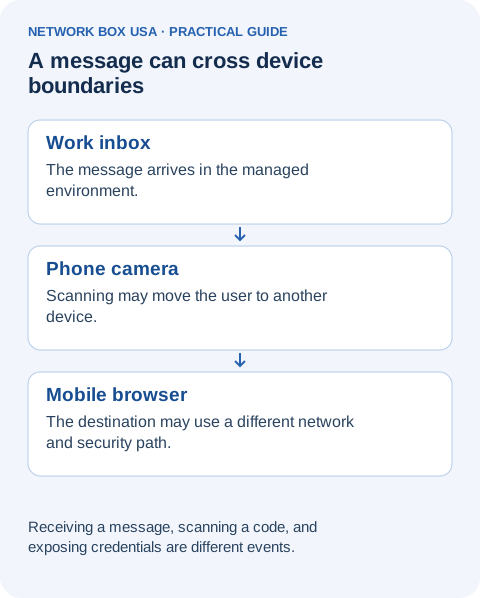
Consider a hypothetical employee who receives an email claiming that a benefits document requires immediate review. The employee reads it on a company laptop, then scans its QR code with a personal phone using cellular data. A page asks for the employee’s work credentials.
The organization may have inspected the incoming email and may protect browsing on the laptop. Neither fact proves that this phone’s browser request traveled through the same web controls. A managed phone could have its own protections; an unmanaged phone might not. Establish the actual device and connection before drawing a conclusion about coverage.
This distinction also changes the investigation. A workstation record with no matching browser visit would not settle what happened on the phone. The email, the mobile browsing activity, and any subsequent account activity are separate pieces of the story.
Give employees a trusted way to complete the task
The FBI’s QR-code safety guidance recommends checking the destination and verifying unexpected requests through a known number or address. For a work-related sign-in request, a practical policy is to open the established company portal or approved application independently, rather than use the destination supplied by an unsolicited message.
If the supposed task is not there, contact the responsible team through the organization’s known directory or support route. Do not use the phone number inside the suspicious email as the verification channel. This gives the employee an action they can take without deciding whether a small mobile sign-in page looks convincing.
Organizations that legitimately use QR codes should make the expected process clear and provide a familiar way to verify it. Teach people to question an unexpected request, not to assume that every square code is an attack.
Make the report describe what happened after the scan
A useful internal report preserves the original message and explains the sequence: which device scanned the code, whether a page opened, whether credentials were entered, whether an authentication prompt was approved, and whether anything was downloaded. Record the approximate time. Employees should not revisit the destination to collect more evidence or send passwords and verification codes to the help desk.
Those details help the security team distinguish receipt of a suspicious message from possible account or device exposure. The team can then use its established incident process to investigate the affected account and device. Treat an uncertain recollection as uncertainty, rather than recording either a confirmed compromise or a clean outcome without evidence.
A short employee reporting card
Report what happened without reopening the suspicious destination. Keep receipt, scanning, and entering credentials separate.
| What happened | What to report |
|---|---|
| Message received | Sender, subject, time, and the approved message-reporting mechanism. |
| QR code scanned | Which device opened the link, when, and the destination if already available safely. |
| Information entered | Whether credentials, MFA approvals, payment details, or downloads were involved; do not send passwords. |
| Help requested | Contact the approved help desk or incident channel and follow its account/device guidance. |
Connect email protection with the next action
Network Box USA’s Managed Email Security addresses phishing, unsafe links, attachments, and other email risks. Its Security Awareness Training supports recognition and reporting, while Secure Web Gateway governs browsing within the agreed coverage. The scope should make clear which users, devices, and traffic paths are protected.
To review how those controls and reporting responsibilities fit your environment, contact our team.