
A successful TLS certificate renewal does not, by itself, prove that your website is serving the new certificate. The certificate must also reach the component handling the connection and become active there. If visitors still receive an expiration warning, compare what the live service presents with what the renewal system issued.
For IT teams and MSPs, the useful distinction is between three outcomes: a certificate was issued, it was deployed, and the intended application successfully uses it. A green status for one stage cannot establish the other two. These certificates are still commonly called SSL certificates, although modern HTTPS uses TLS.
Find the component presenting the certificate
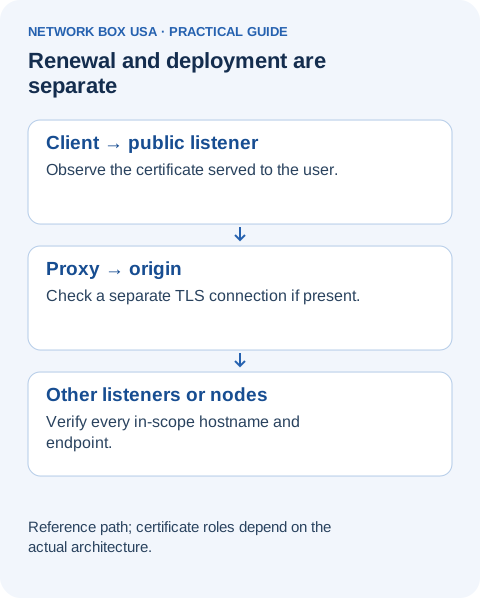
A browser may connect to a reverse proxy, Web Application Firewall, or load balancer before traffic reaches the application server. When TLS ends at that front-end component, its certificate is the one the browser receives. If the front end then establishes another TLS connection to the application, that second connection has its own certificate configuration.
Network Box USA's SSL proxying white paper explains this separation in its server-side fronting discussion. It is why renewing a certificate on an application server may leave the public-facing certificate unchanged.
Consider a hypothetical customer portal with a public HTTPS load balancer and an HTTPS connection to its application server. The application team renews the server's certificate, while the load balancer continues presenting an older one. Both teams can accurately report different results because they checked different connections. The next step is to identify and update the affected certificate, not repeatedly renew the already-current one.
Read what the renewal result actually means
The Certbot documentation provides a concrete example: certbot renew can return a successful exit status when no certificate needed renewal. That result means the command completed without a renewal failure; it does not mean a new certificate was issued during that run.
Certbot also distinguishes deployment hooks, which run after successful renewal, from hooks around renewal attempts. The deployment step must perform whatever the actual service requires to use the new material. A custom installation may need a supported certificate import or reload. Review that step's result separately; a successful issuance is not evidence that every downstream action worked.
Cloud platforms have their own boundaries. AWS Certificate Manager documents automatic-renewal eligibility and explicitly excludes imported certificates. It also treats certificates in different AWS Regions as separate resources that require independent renewal. The presence of a certificate in a management console therefore does not establish how its renewal is handled.
Verify the live connection, then the application
Have the responsible administrator check the exact hostname and port users access, with the correct hostname supplied during the TLS connection. Record the certificate's identity, covered names, validity dates, and whether the expected client trusts its chain. Compare that evidence with the intended replacement. A valid date alone does not establish that the certificate covers the requested name.
Where different nodes or locations can terminate TLS, account for each relevant deployment. Repeat an agreed harmless application transaction after the change. A single successful browser visit is useful evidence for that route, but it cannot establish the state of every other endpoint.
NIST's TLS certificate management guidance recommends maintaining an inventory, assigning owners, automating lifecycle operations, and monitoring both expiration and operational configuration. Apply those recommendations by retaining deployment results and live checks together, with a named person responsible for unresolved discrepancies. Keep private keys out of tickets and ordinary monitoring records.
A certificate deployment verification record
This example shows how to record the observation without treating successful renewal as proof that every listener uses the new certificate. Values below are illustrative.
| Check | Example record |
|---|---|
| Hostname and path | service.example → public proxy → origin |
| Expected certificate | Approved renewed certificate; record serial or fingerprint from the change request. |
| Observed certificate | Record the serial or fingerprint actually served on each tested listener, plus chain and expiry. |
| Owner and result | Name the proxy/origin owner, test time, mismatches, and acceptance decision. |
Make renewal a repeatable service responsibility
Publicly trusted TLS certificate lifetimes are getting shorter. Under the CA/Browser Forum's current requirements, certificates issued from March 15, 2026 through March 14, 2027 have a maximum validity of 200 days. That is a ceiling, not a promise that a particular certificate lasts that long, and the rule does not describe every private PKI certificate.
Use the actual expiration date and a renewal window that leaves time to fix issuance or deployment problems. Agree who operates renewal, who updates each TLS endpoint, who verifies the application, and who receives an escalation if the expected certificate is not live.
Network Box USA's Managed Web Application Firewall service includes certificate-policy validation and enforcement, SSL inspection, and load balancing. Certificate and deployment responsibilities should be confirmed for the actual environment. To discuss those responsibilities alongside your application protection, contact our team.